
A client recently had problems with an IIS website. The website was serving only static image files. No dynamic pages created by a rendering engine. But all requests for this website were returning a 500 Server Error. I traced the problem to an ISAPI filter installed by ColdFusion. (Yes, ColdFusion is still a thing.)
ColdFusion is a Java application and uses Apache Tomcat to render its web pages. To interface with IIS, it installs an ISAPI filter to proxy requests from IIS to ColdFusion’s Tomcat engine. The IIS sites for the ColdFusion pages were working fine, but the site for the static image files was reporting an error that it could not load the ColdFusion ISAPI filter. This caused Windows to shut down the IIS worker processes and return a 500 Server Error. The cause was likely a configuration error for the ColdFusion Tomcat Connector. Since the website didn’t need to use ColdFusion, the client’s preferred to simply remove the Tomcat ISAPI filter for the site. However, IIS Manager was not allowing the filter to be removed.
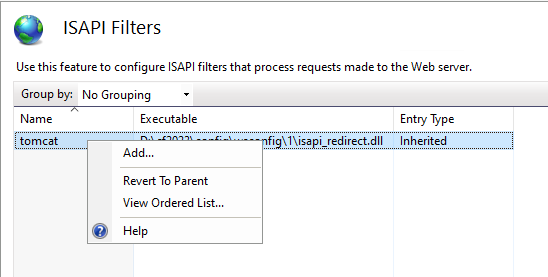
To understand why the ISAPI filer could not be removed requires digging into the structure of the IIS configuration.
ISAPI filters are defined in the isapiFilters section under system.webServer. Server-level (or global) entries are in the main configuration file applicationHost.config (located in directory C:\Windows\System32\inetsrv\config) while site-level (or local) entries are defined either in the site’s web.config file or its location section in applicationHost.config. As it turns out, where the sever-level ispaiFilters section is located is important.
The isapiFilters section for the server level can be in one of two locations. The preferred location, and the one that IIS will normally use, is under configuration / system.webServer. But it can also be under configuration / location / system.webServer. Either location allows the ISAPI to be used by all IIS sites, but it also determines whether IIS Manager will be allowed global setting to be overridden at the site level.
Note that IIS allows isapiFilters to be present in only one of the two locations. If you place isapiFilters entries in both locations, IIS will throw an error.
Location sections are used for site-specific configuration as an alternative to using a web.config file. The path attribute (which is required) is used to specify the site or application for which the configuration entries apply. If path is not set, or set to "" (which is the same as "."), then the location section is global, meaning it applies to all sites and applications. But using a location section for global configuration entries may not allow the settings to be overridden.
The configuration sections that IIS uses are defined in the confgSections section in applicationHost.config. These entries also define at what level the section may be used and whether child levels can override a setting defined at the parent level. Like many configuration sections, isapiFilters has a default override mode of deny, preventing child levels from overriding a parent level settings. But IIS allows a location section to change this “locking” mode to allow sites or applications to override a parent settings. And this is where the placement of the isapiFilters section becomes important.
The entry <location path="" overrideMode="Allow"> is normally included in applicationHost.config to allow child levels to override settings defined at the parent level. Since path is "", it applies to all sites and applications. It allows isapiFilters entries defined at the configuration / system.webServer level to be overridden by IIS Manager. However, it does not allow isapiFilters entries to be overridden when defined at the configuration / location / system.webServer level.
IIS Manager treats entries at the configuration / system.webServer level as being defined at the site level, and the entry type for an ISAPI filter is local. Since it appears the ISAPI filter is defined at the site (parent) level, IIS Manager allows the entry to be overridden. But entries at the configuration / location / system.webServer level are treated as inherited global settings, and in IIS Manager, the entry type is inherited. And here is where things get weird. IIS Manager ignores the override mode setting for location. Because the entry is seen as inherited, and the default override mode for isapiFilters defined in configSections is deny, IIS Manager will not allow the site or application to override the setting.
Fortunately, it’s only IIS Manager that misinterprets the override mode setting. IIS still properly parses the configuration. Thus, while IIS Manager won’t allow you to override the setting, it can so be overridden using a web.config file. Adding the following to a web.config file for the static image files website removed the ColdFusion Tomcat ISAPI filter and allow the site to work.
<?xml version="1.0" encoding="UTF-8"?>
<configuration>
    <system.webServer>
    	<isapiFilters>
            <remove name="tomcat" />
        </isapiFilters>
    </system.webServer>
</configuration>
This could have also been done using a site-specific location section in applicationHost.config. These entries must be under the configuration section.
<location path="images" overrideMode="Allow">
    <system.webServer>
        <isapiFilters>
            <remove name="tomcat" />
        </isapiFilters>
    </system.webServer>
</location>
Leave a Reply