Adventures in System Administration

Category: PowerShell

PS-BackupMySQL: MySQL/MariaDB Backup for Windows


Whether on Linux or Windows, it’s imperative that MySQL databases be regularly backed up to prevent data loss. And any data loss is much more likely to be from human error than a system failure. But the installers for MySQL and MariaDB do not touch on database backups beyond installing the mysqldump utility. Information to be found for backing up MySQL databases pertains mostly to Linux, and the plethora of backup scripts available for Linux are generally not suitable on Windows.

To fill this gap, I created the PS-BackupMySQL package. It provides the PowerShell script Backup-MySqlDatabases to back up all user databases and the mysql system database. (Other system databases are dynamically created and do not need to be backed up.) It’s designed to be run interactively or from a Windows scheduled task to back up databases on a regular schedule. And since databases that are backed up may eventually need to be restored, the script Restore-MySqlDatabases is provided to restore databases – one, many, or all – from the backup files. Also included are Create-MySqlBackupUser which simplifies creating a backup user with only those privileges needed to back up the databases and Create-MySqlBackupTask to create a Windows scheduled task to back up the databases.
Listing IP Address on Windows


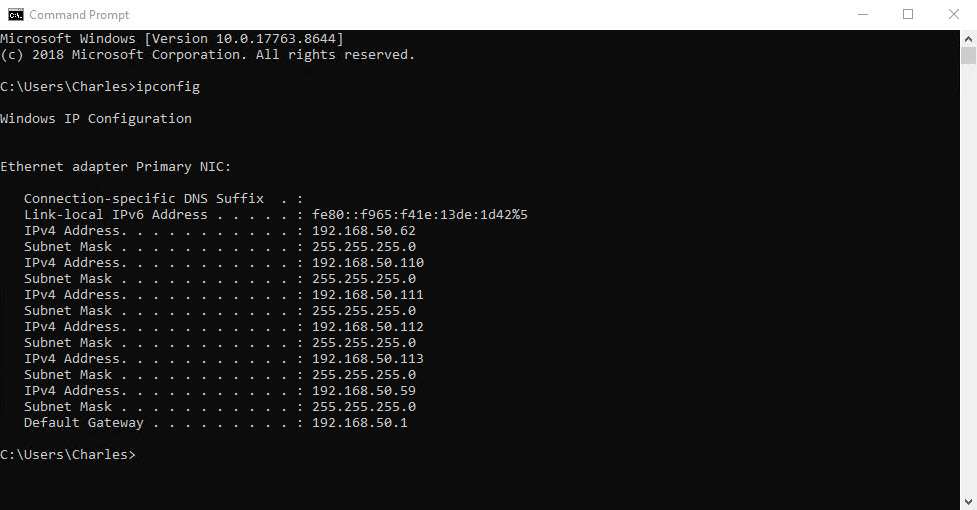
There are times I need to get the list of the IP addresses – usually just IPv4 addresses since use of IPv6 addresses is still not widespread yet – on a Windows server. There are various ways to do this. One of the simplest is to use ipconfig. This is a command-line utility that has been a part of Windows since the early days. Without any options, it returns the IP addresses and subnet masks for every network adapter.

Note the link-local IPv6 address includes a scope id (% followed by the network adapter id). Because link-local addresses are not guaranteed to be globally unique, the scope id is used to identify the network adapter used for the address. This is important on systems with multiple network adapters.

Listing and Moving Active Directory FSMO Roles

FSMO is an Active Directory term that stands for Flexible Single Master Operation. Although Active Directory uses a multi-master enabled database, which provides the flexibility of allowing changes to occur on any domain controller, certain operation requires a single-master model where only one domain controller is allowed to process updates to prevent conflicting updates.

DCOM Permission Errors

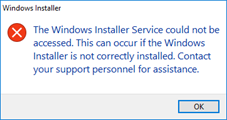
I occasionally encounter errors when trying to install a software package on Windows with the less than helpful message that the Windows Installer Service could not be accessed.

A typical search will return lots of results about reinstalling the MSI Installer service, changing registry entries, and otherwise tinkering with low-level Windows components, but the problem is actually much simpler. The user trying to run the MSI Installer has been denied rights to run it.

The MSI Installer – the Windows Installer service – is a COM (Component Object Model) component. Windows uses a large number of COM comments for the operating system. Like files, users are granted permissions to access and run COM comments. This normally is not an issue. At least it wasn’t until Windows 10/Windows Server 2016. But a bug appears to have crept into Windows that will randomly revoke a user’s permission to run one or more COM objects, the MSI Installer being one of them. Antivirus programs seems to aggravate this, but I’ve encountered the problem on systems with only Windows (or Microsoft) Defender Antivirus.

Loading SQL Server PowerShell Module: SqlServer or SQLPS

I recently created a PowerShell script to restore SQL Server databases. A customer migration required that I restore 2800 plus databases. As the data directory was in a different location on the new server, this meant using the MOVE clause in the RESTORE DATABASE command to place the data files in the correct directory. This was far too many databases to do this manually. But using PowerShell also meant using a SQL Server module.

Two modules are available for SQL Server: SQLPS and SqlServer. SQLPS is the original module. Although no longer updated, it is still included with SQL Server which Microsoft says is for backwards compatibility. It is also the module that SQL Server Agent automatically loads when a job type (or subsystem) is PowerShell. SqlServer is the new and supported module and is installed from the PowerShell gallery. This is the module Microsoft recommends you use for all new development.

Copyright © 2026 Charles Rutledge

Powered by WordPress & Theme by Anders Norén